What Savewise is
Savewise helps you earn more credit card points, airline miles, and cash back on things you were already going to buy. We compare every shopping portal and card-linked offer for a store, in one place, so you can see the best combination before you buy.
We cover 30,000+ stores across 25+ shopping portals, and members regularly earn 7x points or more on a purchase — well beyond what any single credit card pays.
Create your free account
An account is what lets you save favorite stores, set offer alerts, sync your card offers, and see personalized results while you browse. It's free.
Sign in with Apple, with Google, or with a one-time code sent to your email — there's no password to set. Pick one method and stick with it. Signing up with Google one day and Apple the next creates two separate accounts, which is the most common reason a Pro membership looks like it disappeared.
Install Savewise where you shop
The website does most of what Savewise offers on its own. The browser extension adds the two things it can't: syncing your card-linked offers, and popping up automatically on a store page so you never forget to check.
On your phone
Syncing card offers works on desktop browsers and on Safari for iOS. On Android, the full Savewise website works in your mobile browser — add it to your home screen for quick access.
Shopping portals
A shopping portal pays you for clicking through it on your way to a store. The store pays the portal a commission for sending you, and the portal hands most of it back to you as cash, points, or miles. You shop exactly as you normally would.
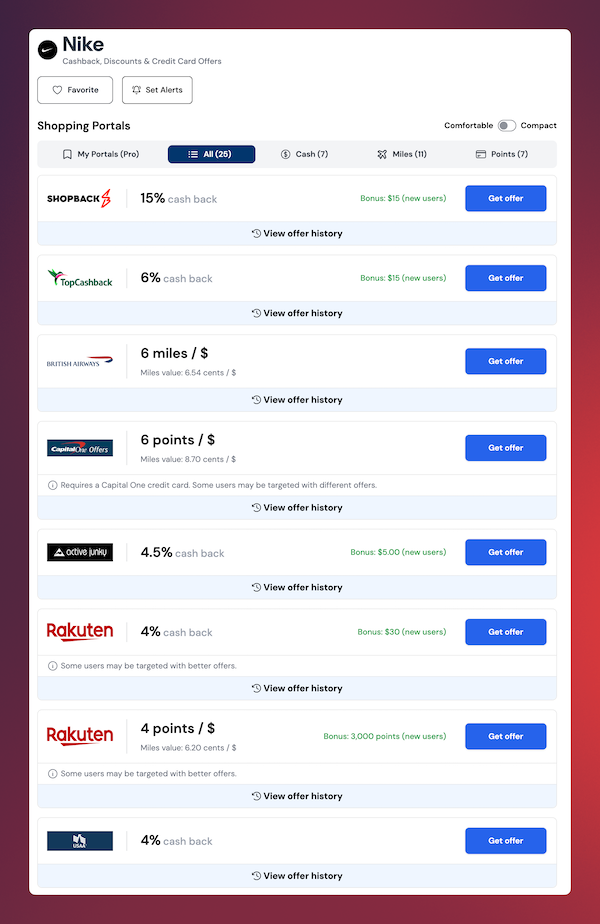
Go straight to nike.com and you pay $100 and earn nothing extra. Click through Rakuten first, at 4% cash back, and you pay the same $100 and get $4 back. Same shoes, same price, a few seconds of work.
Rates differ, a lot
Portals don't pay the same rate for the same store. Rakuten might be at 4% for Nike while another portal is at 15% the same day. Savewise shows every portal's rate for a store side by side, so you're never guessing which one to use.
Three kinds of portal
Pay you a percentage or flat dollar amount back on a purchase. Use these when you want simple, liquid rewards paid to PayPal, your bank, or a portal wallet.
Pay in that airline’s miles instead of cash, posted as "X miles per $1". Best when you’re saving toward award flights in a program you already credit to.
Pay in transferable points like Ultimate Rewards or Membership Rewards. Most flexible, since those points move to a range of airline and hotel partners.
Issuer portals only pay into their own program. To earn Chase points you need a Chase portal, and the one that matches the Chase card you hold — Freedom, Sapphire, or Ink. Cashback portals pay anyone.
How offers are quoted
Portals advertise in different units. Savewise normalizes them so you can compare across portals and cards.
| Offer type | What it means | Example |
|---|---|---|
| Percentage cashback | Earn a fixed percentage of your purchase back as cash. | 5% cashback at Macy’s |
| Fixed cashback | Earn a set dollar amount for your purchase. | $10 back on orders $100+ |
| Miles per dollar | Earn airline miles for every $1 spent. | 3 miles / $1 at Expedia |
| Fixed miles | Earn a set number of miles once you hit a minimum spend. | 1,000 miles on $200+ |
| Points per dollar | Earn credit card points proportional to your spend. | 2 points / $1 at Best Buy |
| Fixed points | Earn a flat number of points for meeting a threshold. | 500 points on $50+ |
Watch for sign-up bonuses
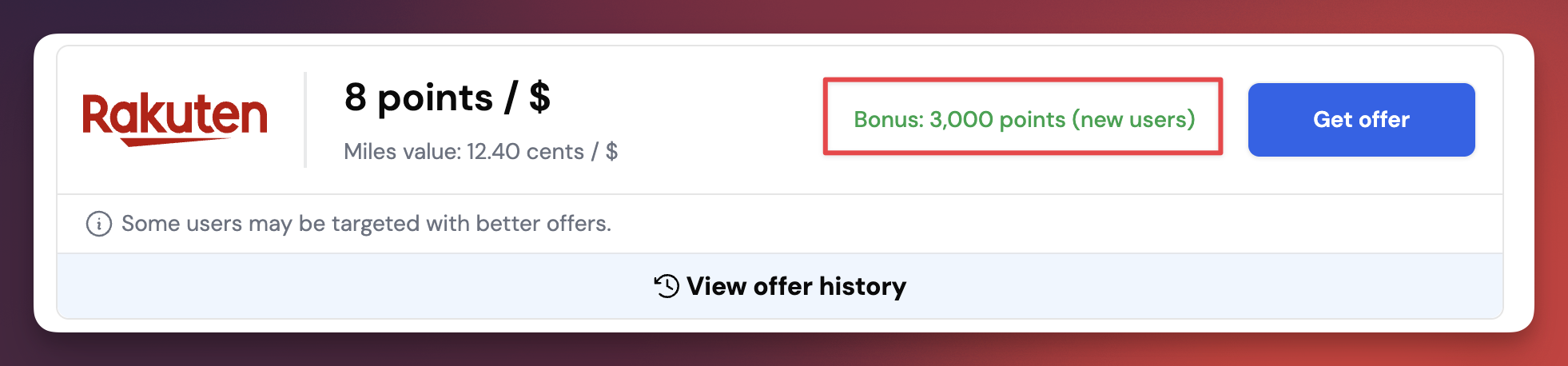
Portals pay a one-time bonus for your first qualifying purchase, and they're often worth far more than the rate itself. Savewise tags these on the store page with a Bonus label, so a portal you've never used can be the right pick for a single purchase.
Card-linked offers
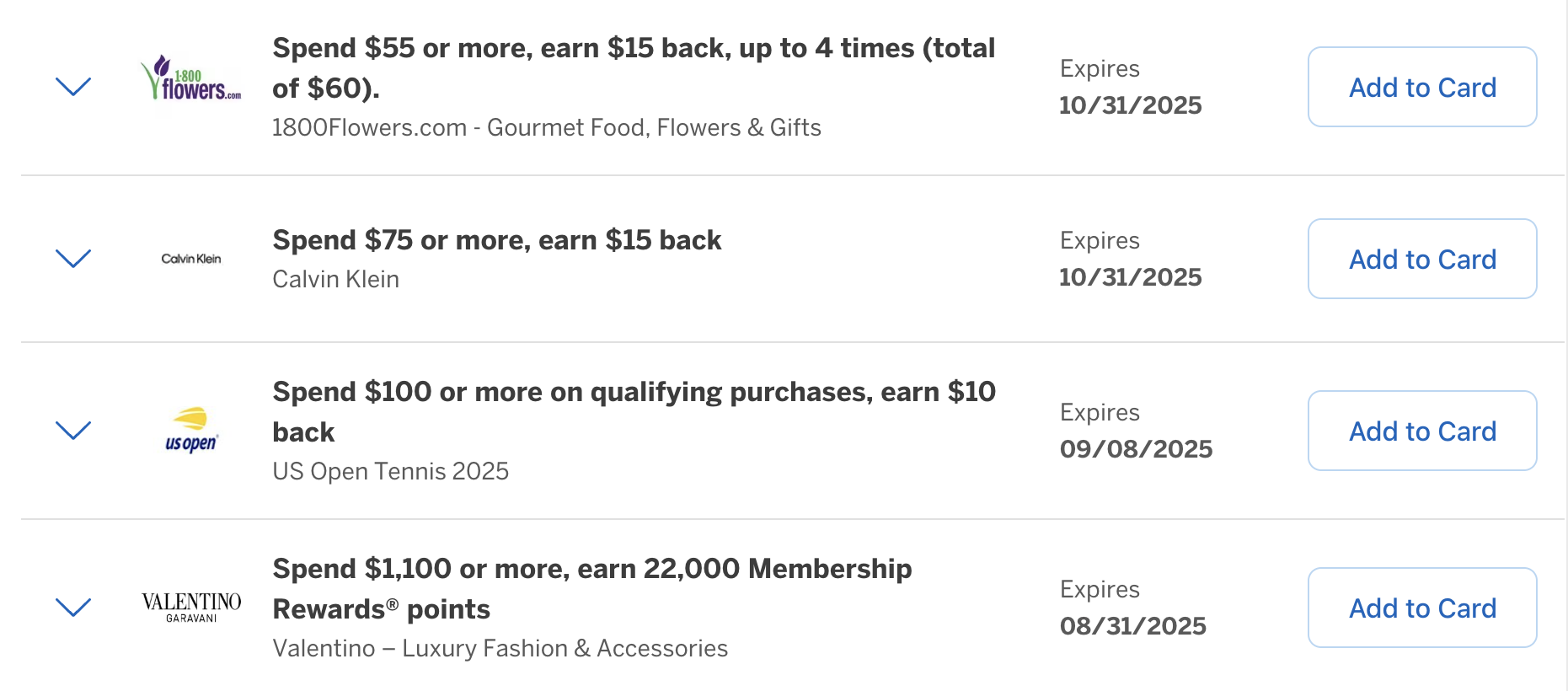
Banks like Amex, Chase, and Citi put personalized merchant offers directly on your credit cards. They pay automatically when you use that card — but only if you activate the offer first, and only on the card that carries it.
- Your Amex Platinum has a lululemon offer on it.
- You activate the offer in your Amex account, or in Savewise.
- You shop at lululemon and spend $120 on that card.
- $20 shows up as a statement credit — nothing else to do.
Sync them into Savewise
Checking four bank portals before every purchase isn't realistic. Syncing pulls your offers into Savewise so they sit next to portal rates on the same store page — which is where you actually spot a stack. Savewise never sees your bank login; the extension reads the offers from the session you're already signed in to.
American Express and Chase, plus activating offers one at a time.
Adds Citi, SimplyMiles, and Rakuten In-Store, plus one-click activate-all across every synced card.
Capital One and Bilt don't support card-linked offers in a form anything can sync, so there's nothing to import for those cards. Wells Fargo and Bank of America are on the way.
Stack them together
This is the whole point. A portal, a card-linked offer, and your card's own earning rate all pay on the same purchase. Savewise exists to show you when all three line up.
Paying with your usual card and skipping the rest would have earned 120 points and nothing else.
Do it in this order
- Activate the card offer first, on the card you intend to pay with.
- Click through from the shopping portal — the last portal click before checkout is the one that gets credited.
- Pay with that same card. The card-linked offer only pays on the card carrying it.
Order matters more than people expect. Activating after you've already checked out, or clicking through a second portal on the way, is the usual reason a stack pays only part of what it should have.
Where stacking stops
One shopping portal, one card-linked offer, one credit card. You can't stack two portals against each other, and you can't use a card offer on a card you didn't pay with. Within those limits, stack everything you can.
Time it right with history and alerts
Portal rates move constantly, sometimes daily. For anything that isn't urgent, waiting for a good rate is often worth more than the purchase decision itself. These two features live in Savewise, not on the portals themselves.
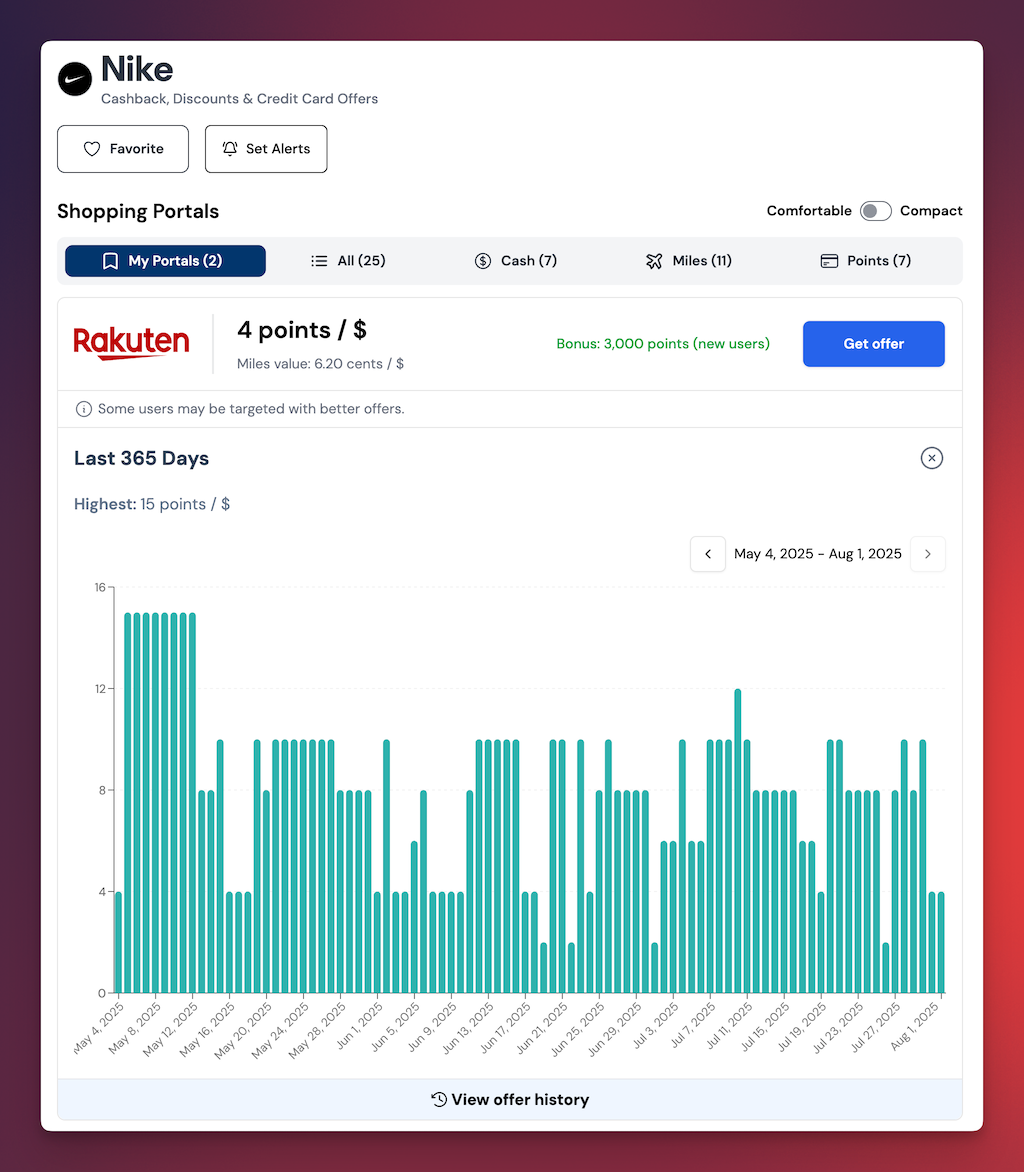
See what a store has paid over time so you know whether today's rate is actually good. 14 days of history free, 365 days with Pro.
Get emailed when a store you care about raises its rate, so you don't have to keep checking. Pro removes the limit on how many you can set.
Savewise refreshes rates every morning Eastern time. Portals can change a rate mid-day, so the portal's own page is the authority at the moment you click through.
Where to start
The fastest way to see the point is to look up something you were already about to buy.
Common questions
These are the questions our support inbox gets most often.
Setup and devices
Shopping portals
Card-linked offers
Stacking
Privacy and billing
Still stuck? Browse the full FAQ, or email us at [email protected] — a real person reads every message.